xmake开发stm32方案
xmake开发stm32分为两个部分,一个是LSP和编译,一个是烧录和调试。
假定已经下载好一个vscode了,如果没有的话,在https://code.visualstudio.com/安装一个。
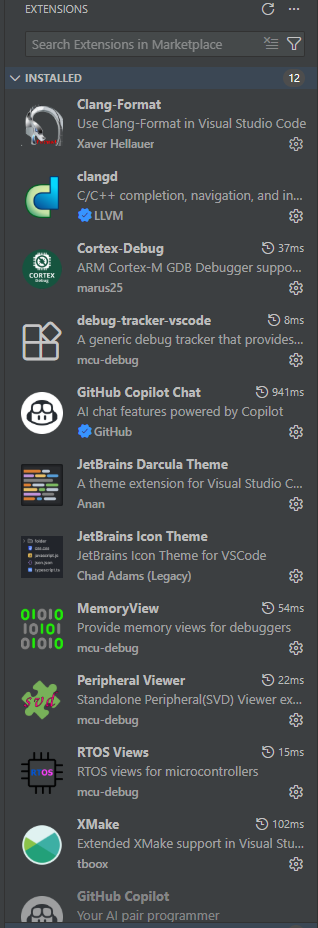
下面是我的所有vscode插件的截图,可以直接按照这个一口气装好,也可以按照后面教程一个一个装。
必备插件清单:
Clang-Format:代码格式化工具。clangd:提供极其强大的代码补全、语法检查和跳转功能(LSP)。Cortex-Debug:用于嵌入式调试的核心插件。xmake:提供 Xmake 的图形化配置支持。
LSP和编译
LSP,也就是提供补全和高亮的,这里我的方案是clangd。而构建工具选择xmake,编译器选择gcc。格式化选的是Clang-Format。
先介绍一下需要安装的vscode插件,有Clang-Format、clangd、xmake。
clangd
这个无需额外安装,在clangd这个插件安装完成以后,vscode会提示你缺少clangd,然后有个install按钮,你按了以后等待安装完成即可。
xmake
xmake的安装很简单,我只教在windows上最简单的方法,其他方法参考https://xmake.io/zh/guide/quick-start.html。
需要先在windows的搜索里面搜索PowerShell,然后打开。然后复制粘贴下面这个内容,回车,然后等结束。
irm https://xmake.io/psget.text | iex
gcc
安装-10.3-2021.10-win32.exe这个,并且记住自己安装的路径。这个文件也可以在https://developer.arm.com/downloads/-/gnu-rm官网下载。
把这个添加到系统环境变量的Path,添加进去的目录是C:\Program Files\GNU Arm Embedded Toolchain\10 2021.10类似于这样子的。添加环境变量的教程参考https://www.cnblogs.com/wutou/p/17890768.html。
烧录和调试
烧录和调试需要OpenOCD加上Cortex-Debug插件。
openocd
可以在https://openocd.org/下载最新版,安装即可。
Cortex-Debug插件配置
左键这个插件的齿轮,点击Setting。然后找到Cortex-debug: Arm Toolchain Path,点击Edit in setting.json。
在这个文件里面找到"cortex-debug.armToolchainPath"这部分,然后添加下面这样子的内容。
    "cortex-debug.liveWatchRefreshRate": 100,
    "cortex-debug.armToolchainPath": "C:/Program Files/GNU Arm Embedded Toolchain/10 2021.10/bin",
    "cortex-debug.openocdPath": "C:/Program Files/OpenOCD/bin/openocd.exe",
launch.json的配置
在vscode左边栏的Run and Debug页面,点击Add Configuation,然后就会自己创建一个launch.json,这个文件按照下面这样子写。每次新的调试需要改的地方就是"executable",还有就是"configFiles",这个根据项目的MCU和项目名字不同略微调整。
{
    // Use IntelliSense to learn about possible attributes.
    // Hover to view descriptions of existing attributes.
    // For more information, visit: https://go.microsoft.com/fwlink/?linkid=830387
    "version": "0.2.0",
    "configurations": [
        {
            "cwd": "${workspaceRoot}",
            "executable": "./build/cross/arm/debug/test_prj.elf",
            "name": "Debug with OpenOCD",
            "request": "launch",
            "type": "cortex-debug",

            "interface": "swd",

            "configFiles": [
                "interface/cmsis-dap.cfg",
                "target/stm32f4x.cfg"
            ],

            "servertype": "openocd",
            "searchDir": [],
            "runToEntryPoint": "main",
            "showDevDebugOutput": "raw"
        }
    ]
}
xmake构建stm32项目介绍
首先我们需要先用STM32CubeMX(版本要比较新)生成一个CMake和GCC的项目。在STM32CubeMX的Project Manager项目下的ToolChain / IDE选择CMake,然后再在Default Compiler/Linker里面选择GCC。这样子生成出来才有我们需要的链接器脚本。
这个脚本我做了一些精简,大致简单介绍一些结构性的东西。
第9行的"plugin.compile_commands.autoupdate"这个的目的是为了让clangd可以提供语法高亮和补全。
add_defines可以让我们定义一些宏,比如STM32F429xx就是是必须的。add_cflags这个是C语言的一些选项调整。
set_project("2026robot")
set_version("0.1")
set_xmakever("3.0.0")

set_languages("c11")
set_languages("cxx17")

add_rules("mode.debug", "mode.release")
add_rules("plugin.compile_commands.autoupdate", {outputdir = "."})

-- 包含arm编译器工具链配置
includes("stm32_toolchain.lua")

target("2026robot")
    set_kind("binary")

    -- 设置交叉编译工具链
    set_toolchains("arm-none-eabi-custom")

    -- 设定文件名
    set_filename("2026robot")

    -- 芯片型号宏定义
    add_defines("STM32F429xx")

    -- 生成 .bin and .hex文件
    add_rules("stm32.convert_bin_hex")

    -- CMSIS的文件和头文件路径,包括startup file
    add_rules("stm32.f4xx.cmsis", {device = "stm32f429xx", toolchain = "gcc"})

    -- STM32 HAL driver库的文件和头文件
    add_rules("stm32.f4xx.hal")

    -- FreeRTOS 源码
    add_rules("stm32.f4xx.hal.freertos")

    -- stm32CubeMX 生成的应用代码
    add_files("Core/Src/*.c")
    -- 头文件
    add_includedirs("Core/Inc")

    -- user code
    add_files("src/**.c")

    -- Core/target flags for Cortex-M4 + FPU
    add_cflags(
        "-mcpu=cortex-m4",
        "-mthumb",
        "-mfpu=fpv4-sp-d16",
        "-mfloat-abi=softfp",
        "-std=c11", "-Wall",
        "-fdata-sections",
        "-ffunction-sections",
        {force = true}
    )

    add_asflags(
        "-mcpu=cortex-m4",
        "-mthumb",
        {force = true}
    )

    add_ldflags(
        "-mcpu=cortex-m4",
        "-mthumb",
        "-mfpu=fpv4-sp-d16",
        "-mfloat-abi=softfp",
        "-Wl,--gc-sections",
        "-Wl,-Map=2026robot.map",
        "-TSTM32F429XX_FLASH_gcc10.ld",
        {linker = true, force = true}
    )
工具链的定义在stm32_toolchain.lua这个文件里面,主要是定义了arm-none-eabi-custom工具链。
toolchain("arm-none-eabi-custom")
    set_kind("standalone")

    set_toolset("cc", "arm-none-eabi-gcc")
    set_toolset("cxx", "arm-none-eabi-g++")
    set_toolset("as", "arm-none-eabi-gcc")
    set_toolset("ld", "arm-none-eabi-gcc")

    set_toolset("ar", "arm-none-eabi-ar")
    set_toolset("objcopy", "arm-none-eabi-objcopy")
    set_toolset("size", "arm-none-eabi-size")
toolchain_end()